Page History
BasicVerwenden Sie Benachrichtigungen, um Benutzer über Aktualisierungen oder Änderungen des Systemstatus zu informieren. Die Kommunikation mit Anwendern und die Bereitstellung von sofortigem Feedback sind wichtig, um Vertrauen aufzubauen. Obwohl Benachrichtigungen eine wirksame Methode der Kommunikation mit Benutzern sind, sind sie störend und sollten sparsam eingesetzt werden. Es gibt zwei Standart Benachrichtigungen
Use notifications to inform users about updates or changes to the system status. Communicating with users and providing immediate feedback is important for building trust. Although notifications are an effective way to communicate with users, they are disruptive and should be used sparingly. There are two standard notifications:
| Table of Contents | ||
|---|---|---|
|
Overview
System information and notifications offer only limited space for content, so the content must be short and concise. A user should be able to quickly understand the notification, be informed about the situation and know what to do next.
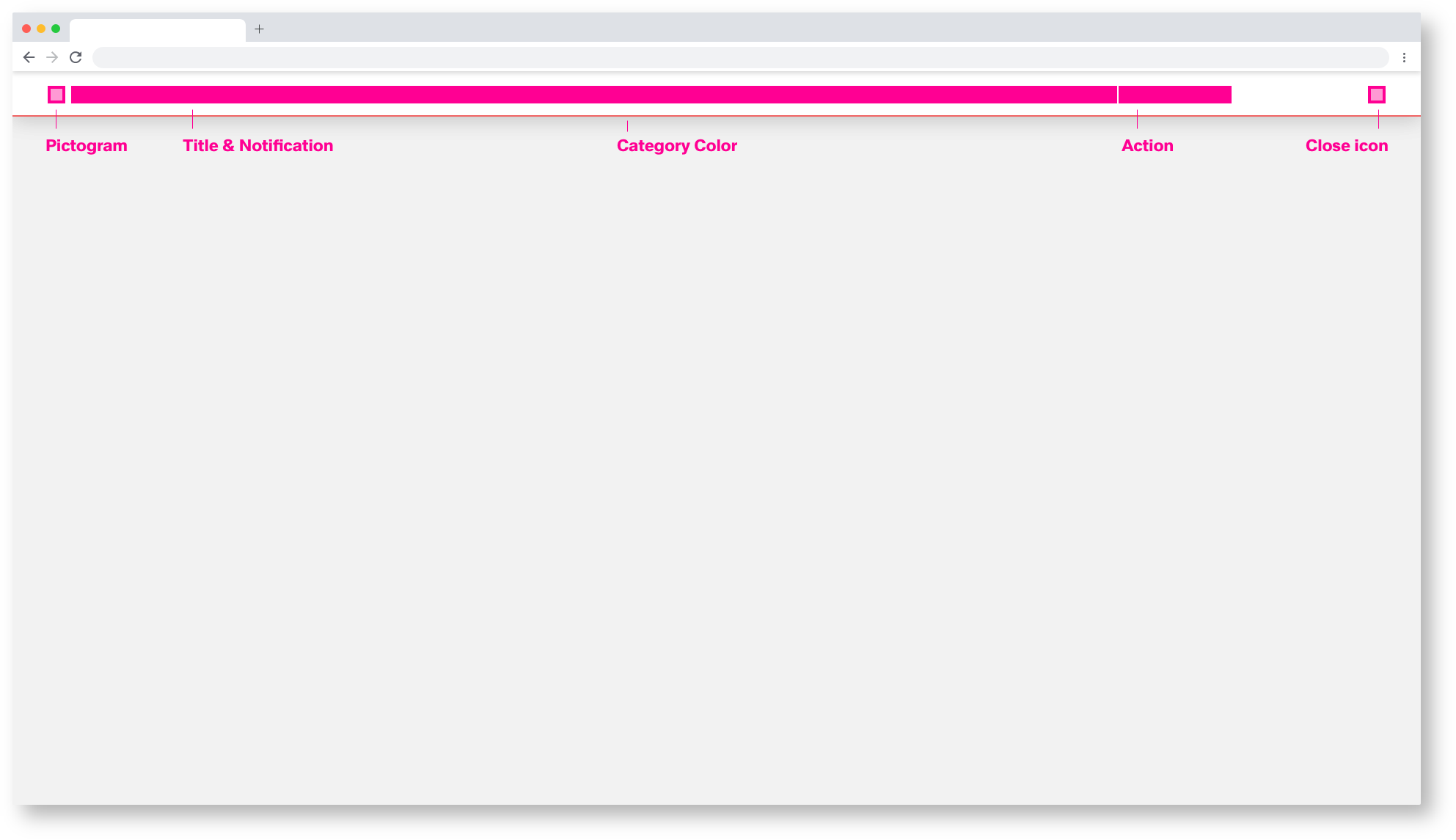
Pictogram
The pictogram should visually support the title and content of the notification. The pictogram replaces the category colour within the barrier-free presentation. For more information, see the section on accessibility.
Titel & Notification
The title should be short and descriptive, explaining the most important information. If possible, communicate the main message by the title alone. Limit the content to one or two short sentences. Explain how the problem can be solved by stating any troubleshooting actions or next steps.
If a system information or notification requires a message that is longer than two lines, add a "Show more" link that takes the user to a view of the full notification message.
Action Link
You can insert links within the notification body to direct the user to the next steps. Do not confuse the user with too many possibilities. Two actions, perform action and do not perform action, are sufficient.
Category Color
The category colour gives an indication of the type and importance of the notification. Here it is possible to color the pictogram, the action link and the lower category color bar in the respective color.
Inhalt
System Informationen und Benachrichtigungen bieten nur begrenzten Raum für den Inhalt, weshalb der Inhalt kurz und prägnant sein muss. Ein Benutzer sollte in der Lage sein, die Benachrichtigung schnell zu verstehen, sich über die Situation zu informieren und zu wissen, was als nächstes zu tun ist.
Titel
Der Titel sollte kurz und beschreibend sein und die wichtigste Information erläutern. Wenn möglich, kommunizieren Sie die Hauptaussage allein durch den Titel. Beschränken Sie den Inhalt auf einen oder zwei kurze Sätze. Erklären Sie, wie das Problem gelöst werden kann, indem Sie alle Maßnahmen zur Fehlerbehebung oder die nächsten Schritte angeben.
Wenn eine System Informationen oder Benachrichtigungen eine Nachricht erfordert, die länger als zwei Zeilen ist, fügen Sie einen Link "Mehr anzeigen" ein, der den Benutzer zu einer Ansicht der vollständigen Benachrichtigungsnachricht führt.
Link
Sie können Links innerhalb der Notifizierungsstelle einfügen, die den Benutzer zu den nächsten Schritten weiterleiten. Verwirren Sie den User nicht durch zu viele Möglichkeiten. Zwei Aktionen, Aktion ausführen und Aktion nicht ausführen, reich aus.
Pictogram
Color