Versions Compared

Key

  • This line was added.
  • This line was removed.
  • Formatting was changed.

...

UI Tabs


UI Tab
titleOverview

The color concept.

Maintaining consistent and engaging digital experiences within Germanedge, whether applications or experiences, requires a sensitive use of color. The following color concepts form the basis for our efforts to create a unique user interface design. The color world of our user interface "Inspire" is clean and reduced. 

The colour system is based on 2 main colours, the brand colour and the primary colour "Tokyo". The two colours together, because they are complementary to each other, result in a rounded colour picture. In addition, various alarm colours are added, but it should be noted that the alarm colours never resemble the brand- and primary colours.


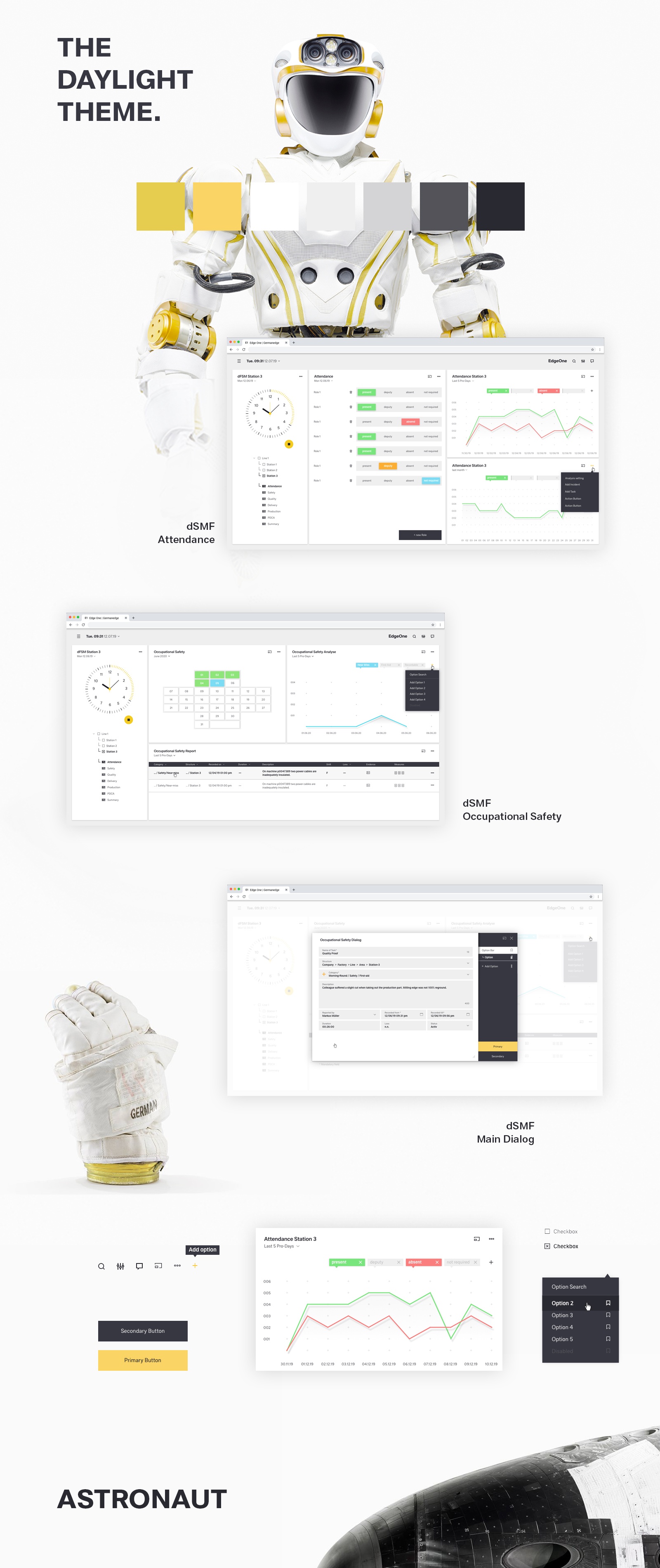
The color palette of Germanedge is basically divided into two different themes. The "Daylight" and "Nightshift" theme.  The color palette of each theme brings a uniform and recognizable consistency to our interface.


The anatomy of the Germanedge colours.

As the basis for both themes, the neutral "Tokyo" colour family dominates, separating the contents with subtle nuances. 
It is important that the nuances do not run into each other. The yellow brand colour is the primary action colour for all Germanedge products and experiences. Additional colours are used sparingly and purposefully.


The themes.

The themes serve as a framework for colour worlds within Inspire, with each theme based on a specific primary background colour. There are two standard themes. The Daylight theme "Astronaut" and the Nightshift theme"Tokyo at Night". 


Highest Contrast

WCAG AA

WEB AIM


UI Tab
titleUsage

Usage of the Astronaut Theme Colors

(tbd)


Usage of Tokyo Theme Colors

(tbd)

#idRoleValue
?Default page backgroundTokyo 100
#202026

?Default boardlet backgroundTokyo 90
#292930


UI Tab
titleCode

https://wasp2-dev.myapp.de:444/live-style-guide/theming


Image RemovedImage Removed
Tokyo Colors


Brand
Colors


Alerts Colors


scss variables#hex

scss variables#hexDanger
scss variables#hexWarning
scss variables#hexSuccess
scss variables#hexNote
scss variables#hex
Tokyo 100
$tokyo-100#202026

Image Removed

Brand 100
$brand-100#957616Image RemovedDanger 100
$danger-100#F50B09

Image Removed

Warning 100
$warning-100#FF7A00

Image Removed

Success 100
$success-100#7FD966

Image Removed

Note 100
$note-100#14D2FFImage Removed
Tokyo 90
$tokyo-90#292930Brand 90
$brand-90#A88724Image RemovedDanger 80
$danger-80#F55150

Image Removed

Warning 80
$warning-80#FF902A

Image Removed

Success 80
$success-80#94DF7F

Image Removed

Note 80
$note-80#3BD9FF

Image Removed

Tokyo 80
$tokyo-80#373741Image RemovedBrand 80
$brand-80#E0B535

Image Removed

Danger 60
$danger-60#F77373

Image Removed

Warning 60
$warning-60#FFA655

Image Removed

Success 60
$success-60#A9E599

Image Removed

Note 60
$note-60#62E1FF

Image Removed

Tokyo 70
$tokyo-70#535359Brand 70
$brand-70#FACA3DImage RemovedDanger 40
$danger-40#F99696

Image Removed

Warning 40
$warning-40#FFBC7F

Image Removed

Success 40
$success-40#BFECB2Image RemovedNote 40
$note-40#89E8FFImage Removed
Tokyo 60
$tokyo-60#7E7E82

Image Removed

Brand 60
$brand-60#FAD465

Image Removed

Danger 20
$danger-20#FBB9B9

Image Removed

Warning 20
$warning-20#FFD2AA

Image Removed

Success 20
$success-20#D4F2CC

Image Removed

Note 20
$note-20#B0F0FFImage Removed
Tokyo 50
$tokyo-50#A9A9AC

Image Removed

Brand 50
$brand-50#FBDC83Image RemovedDanger 00

#FDDCDCImage RemovedWarning 00

#FFE8D4Image RemovedSuccess 00

#E9F8E5

Image Removed

Note 00

#D7F7FF

Image Removed

Tokyo 40
$tokyo-40#BCBCBE

Image Removed

Brand 40
$brand-40#FCE5A2

Image Removed


Tokyo 30
$tokyo-30#D4D4D5

Image Removed

Brand 30
$brand-30#FDEDC1Image Removed


Tokyo 20
$tokyo-20#EFEFEFImage RemovedBrand 20
$brand-20#FEF6E0

Image Removed


Tokyo 10
$tokyo-10#FFFFFFImage RemovedBrand 10
$brand-10#FDFBF4Image Removed


Image Removed
Astronaut Colors


Brand
Colors


Alerts Colors


scss variables#hex

scss variables#hexDanger
scss variables#hexWarning
scss variables#hexSuccess
scss variables#hexNote
scss variables#hex
Astronaut 100
$astronaut-100#0F0E0DBrand 100
$brand-100#BE9C38

Image Removed

Danger 100
$danger-100#F06464

Image Removed

Warning 100
$warning-100#FDB225Image RemovedSuccess 100
$success-100#9FDB57Image RemovedNote 100
$note-100#87DFF0Image Removed
Astronaut 90
$astronaut-90#272625

Image Removed

Brand 90
$brand-90#D9B23D

Image Removed

Danger 80
$danger-80#F17575

Image Removed

Warning 80
$warning-80#FDBA3D

Image Removed

Success 80
$success-80#A9DF69Image RemovedNote 80
$note-80#94E2F1Image Removed
Astronaut 80
$astronaut-80#3F3E3D

Image Removed

Brand 80
$brand-80#F2D43D

Image Removed

Danger 60
$danger-60#F38686

Image Removed

Warning 60
$warning-60#FDC355

Image Removed

Success 60
$success-60#B4E37C

Image Removed

Note 60
$note-60#A1E6F3Image Removed
Astronaut 70
$astronaut-70#575655

Image Removed

Brand 70
$brand-70#F5DB5D

Image Removed

Danger 40
$danger-40#F59797

Image Removed

Warning 40
$warning-40#FDCB6DImage RemovedSuccess 40
$success-40#BFE78F

Image Removed

Note 40
$note-40#AFE9F5

Image Removed

Astronaut 60
$astronaut-60#6F6E6D

Image Removed

Brand 60
$brand-60#F7E06F

Image Removed

Danger 20
$danger-20#F6A8A8

Image Removed

Warning 20
$warning-20#FDD485Image RemovedSuccess 20
$success-20#C9EBA1Image RemovedNote 20
$note-20#BCEDF6

Image Removed

Astronaut 50
$astronaut-50#878686Image RemovedBrand 50
$brand-50#F7E692Image Removed


Astronaut 40
$astronaut-40#B7B6B6Image RemovedBrand 40
$brand-40#F8EBA7

Image Removed


Astronaut 30
$astronaut-30#CFCECE

Image Removed

Brand 30
$brand-30#F8EFBC

Image Removed


Link
tbd#00AEE2

Image Removed

Astronaut 20
$astronaut-20#E7E6E6

Image Removed

Brand 20
$brand-20#F7F1CFImage Removed


Astronaut 10
$astronaut-10#F2F2F2

Image Removed

Brand 10
$brand-10#F5F2DEImage Removed