
Page History
...
- Tabs only. Boardlets with tabs are one of the primary display options. The tabs are arranged side by side. There is no default number of tabs within the boardlet.
- Tabs with buttons. Boardlets with tabs and buttons are one of the primary display options. This display is used as soon as the boardlet has multilayer content as well as a contentaction. In case the action is only available in one tab, it will be displayed disabled in all other tabs. This is necessary to avoid unpleasant jumping back and forth of the molecules within the organism. The number of possible actions is limited to a maximum of 2 buttons.
- Buttons only. Boardlets with buttons only are one of the primary display options. This representation can be used in case an action is required in the boardlet. The number of possible actions is limited to a maximum of 2 buttons.
- Tabs with actionbar. Boardlets with tabs and a actionbar are one of the secondary display options. This combination can be used in the kiosk mode and enables the control of the tabs. E.g. the rotation of the tabs as well as time control of the rotation.
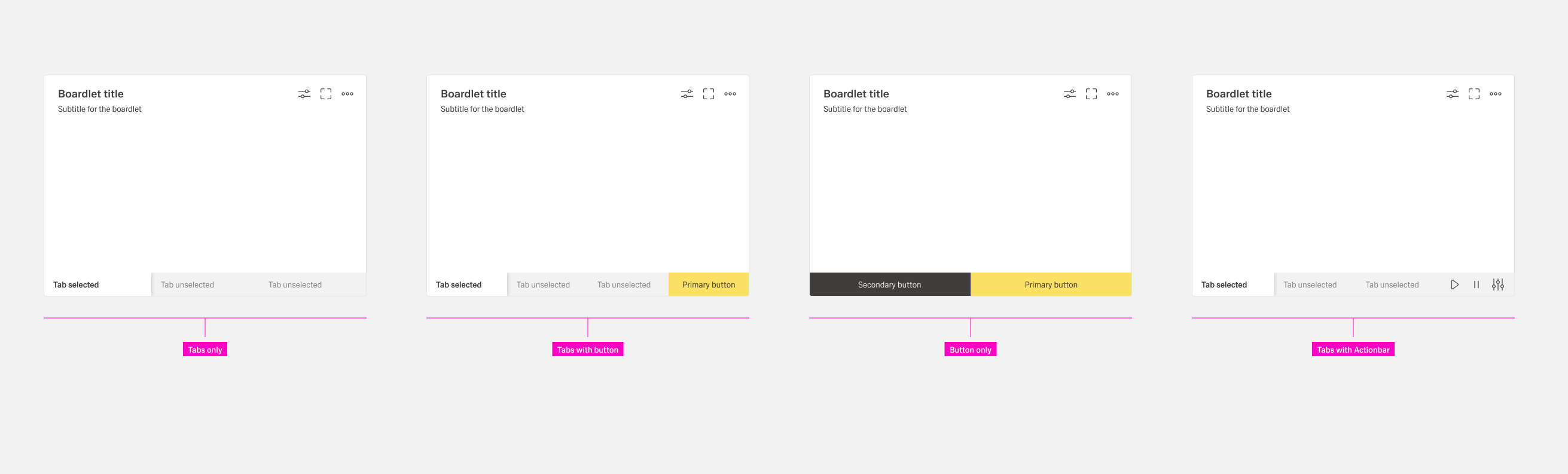
Boardlet footerbar
Each boardlet has the possibility to use a footerbar. All 4 different combinations are allowed, though "tabs with an actionbar" are only allowed in the kiosk view.
...
