Page History
...
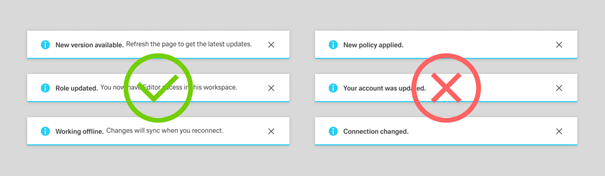
System notifications communicate system-generated updates such as connection changes, maintenance, or session expiry.
Keep the text relevant and informative, and include only the context needed to understand impact.
Write a concise title in sentence case. Add a description only when extra meaning is needed (timing, impact, or where to find something).
When shown as a toast, keep title and description especially brief.
Success Notification
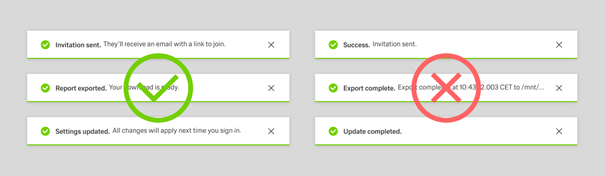
Success notifications confirm that an action has been completed.
Keep the text short and scannable, and use consistent patterns like “[object] [action taken]” (“Sales order created”) or “[count] [objects] [action taken]” (“2 sales orders were deleted.”).
Include names/IDs only when they are needed.
Place the main message in the title and add a brief description only when it clarifies what happens next.
Warning Notification
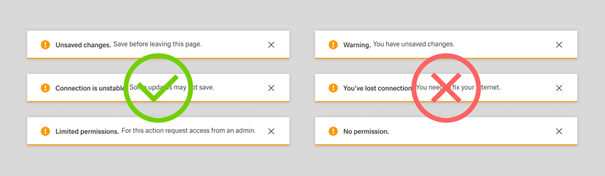
Warning notifications give advance notice when data loss or an error state could occur.
Use factual, actionable wording and structure the message as risk + consequence + preventive action (for example, “Unsaved changes” + “Save before leaving this page.”).
Include only the context needed to act.
Error Notification
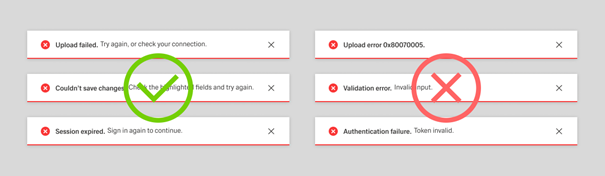
Error notifications are used when a problem has occurred and progress may be blocked.
Explain what went wrong in plain language and make recovery clear (for example, “Couldn’t save changes” + “Check required fields and try again.”).
Avoid technical codes unless a user-facing explanation is also provided.