
Page History
...
Do not place more than four actions and never more than three icon actions per boardlet toolbar . Group additional actions under the More action.
Hierachy of
...
Actions
The buttons inside Inspire follow a hierarchical order. It is important to create a visual hierarchy between the buttons in the user interface to guide the user’s attention towards the desired user flow.
...
- Horizontal - From left to right, place ghost buttons first, then secondary buttons and last if there exists a primary button.
- Vertical - From top to bottom, place the primary button first, then secondary buttons and ghost buttons at the bottom.
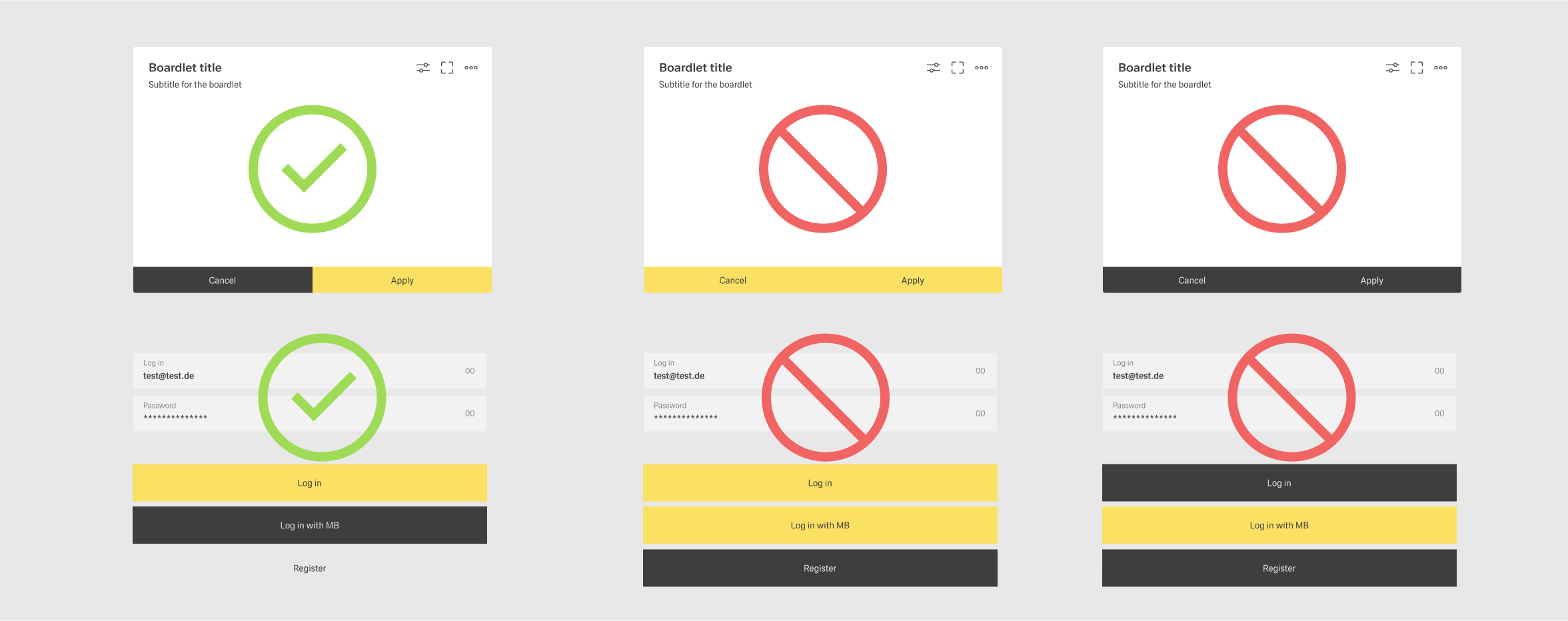
Creating a User Flow
The goal of primary and secondary actions is to create a user flow through multiple dashboards of a application. The user is guided through this flow by the primary action of the dashboard. Secondary actions show options to modify the indended flow like canceling, resetting, or going back.
The user flow guides the user through the fundamental tasks related to a goal they want to achieve within the group of dashboard. This goal often mirrors a use case from the requirements for the application. Examples for these tasks are:
- Creating a new object within the system.
- Viewing a specific set of information.
- Going throu a standard process like taking samples.
Quick Guide
Example User Flow - Viewing Data
The example applications overlooks a large storehouse with many different containers. These containers are constenty filled with some kind building materials. The amount of this material is constantly chnaging as it gets used and refilled. The application tracs, among other things, these containers and the material they contain. The user wants to look at the fluctuation of material within one or multiple containers.
The first dashboard shows the home screen of the storage terminal. The main task for this terminal would be to survey the containers and material. Thereby the primary action leads to a list of containers.
