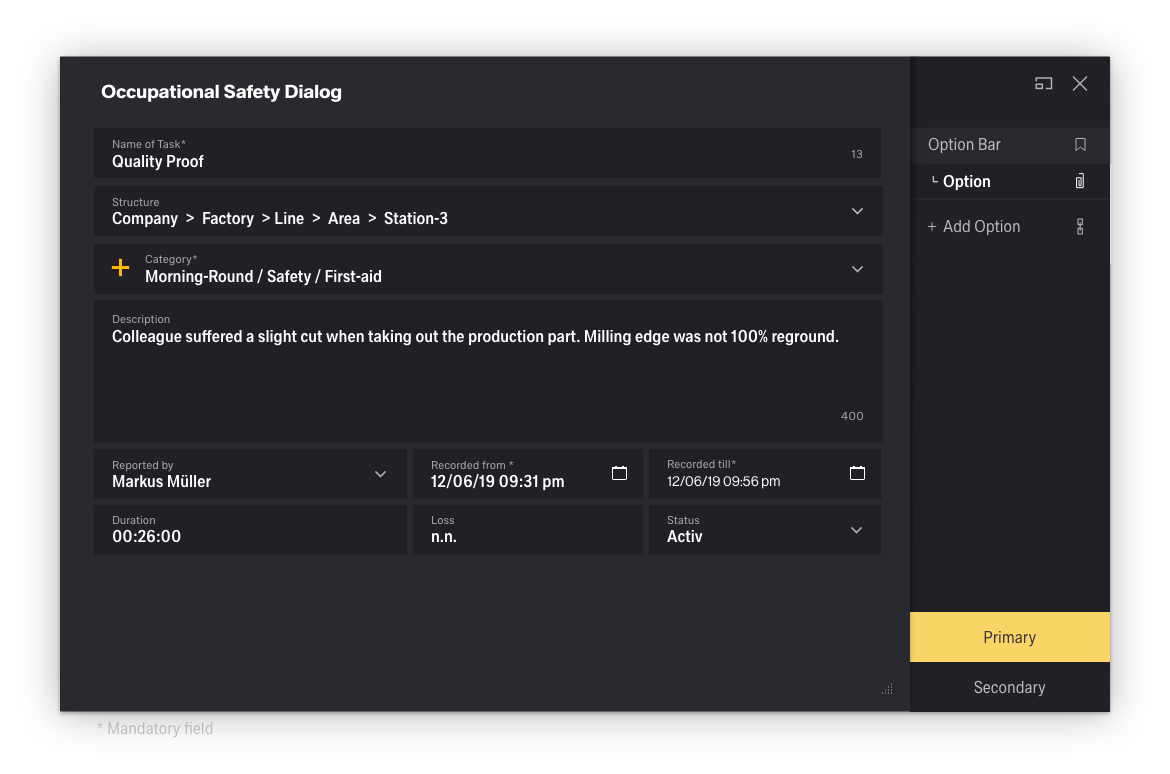
Spacing is an important, and often underestimated, part of the visual design within Inspire. The Spacing serves to make all distances within the modules look the same. The different spacings allow for flexible arrangement within the system.
The spacing can be used horizontally and vertically. It refers to padding, margin, but also to distances between the elements, the "spacing scale".
Use the spacing scale when building individual components. It includes small increments needed to create appropriate spatial relationships for detail-level designs.
Padding & margin spacing
Spacing Scale
| Where property is one of: | |
|---|---|
| m - | for classes that set margin |
| p - | for classes that set padding |
| Where sides is one of: | |
| t - | for classes that set margin-top or padding-top |
| b - | for classes that set margin-bottom or padding-bottom |
| l - | for classes that set margin-left or padding-left |
| r - | for classes that set margin-right or padding-right |
| x - | for classes that set both *-left and *-right |
| y - | for classes that set both *-top and *-bottom |
| blank - | for classes that set a margin or padding on all 4 sides of the element |
| Where size is one of: | rem | px |
|---|---|---|
$spacer * 0 | 0 | 0 |
$spacer * 1 | 0.125 | 2 |
$spacer * 2 | 0.25 | 4 |
$spacer * 3 | 0.375 | 6 |
$spacer * 4 | 0.5 | 8 |
$spacer * 5 | 0.75 | 12 |
$spacer * 6 | 1 | 16 |
$spacer * 7 | 1.375 | 22 |
$spacer * 8 | 1.5 | 24 |
$spacer * 9 | 1.625 | 26 |
$spacer * 10 | 2 | 32 |
$spacer * 11 | 2.5 | 40 |
$spacer * 12 | 3 | 48 |
$spacer * 13 | 4 | 64 |
Padding & margin best practice
.mt-0 {
  margin-top: 0 !important;
}

.ml-1 {
  margin-left: ($spacer * .125) !important;
}

.px-2 {
  padding-left: ($spacer * .25) !important;
  padding-right: ($spacer * .25) !important;
}

.p-3 {
  padding: $spacer !important;
}
Other Spacing
There are a few other methods that can be used for spacing elements. Each has its own unique use case. Here are some representative examples of these classes.
Example of spacing scale
