Lorem ipsumLorem ipsum
Action Link
Link with Icon
ContentWe recommend links be three words or fewer. Because links take users to a new location, it is important that their labels accurately reflect the content users will find at the link destination. Use meaningful labels for links and avoid terms like “click here” or the web address itself. Links need to be clear enough to be understood by the user, but should not be so long that the text wraps unless used inline. BehaviorsInteractionsMouseUsers can open a link by clicking anywhere along the link text or on the associated icon. KeyboardUsers can open a link by pressing Screen readersVoiceOver: Users can open a link by pressing JAWS: Users can open a link by pressing NVDA: Users can open a link by pressing Link typesStandalone linkStandalone links are used on their own directly following content. They should not be used within sentences or paragraphs. Standalone links are the default link style for Carbon and only have an underline in the hover state. The standalone link component can be paired with an icon. Use 16px icons and place them to the right of the link. Icons should always be the same color as the link text. !!!insert picture here Inline linkInline links are used in sentences or paragraphs of text. The inline link behaves the same as the standalone link but it is styled with an underline. This helps differentiate them from the text they are placed next to and makes it clear users can interact with them. Inline links should not be used on their own and should not be paired with icons. ModifiersVisited styleBy default, the link component does not use a visited style. Visited links indicate that a user has already opened the link so they can be a helpful indicator during task completion. Visited styles should be used sparingly because they often clutter the the page and add further visual noise as users are trying to navigate a product. They can be used if it is important that a user knows they have already clicked on a link. Links that trigger actionsSome links trigger actions to aid task completion in addition to navigation. These links should still serve a navigation purpose. A common example is linking phone numbers so clicking the website automatically opens and calls the phone number when clicked. The label and any accompanying icons should make it clear what action will be triggered and where the user will be directed. Related | ||||||||||||||||||


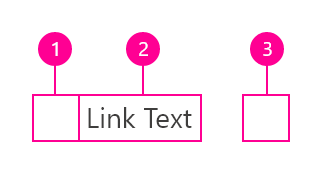
StyleColor!!! define color here
Interactive States
!!! add picture here TypographyLinks should not exceed three words.
StructureRecommendedLinks can be grouped horizontally or vertically and must be underlined. The following specs are not built into the Link component but are recommended by design as the proper distance between grouped Links.
|
CodePreview the link component with the React live demo. For detailed code usage documentation, see the Storybooks for each framework below. !!! create live demo here. Test |
Accessibility!!!this section needs to rework How it worksThe link Carbon component is primarily a native HTML hyperlink navigational element. The Accessibility considerationsThis component has been validated to meet the WCAG 2.0 AA and Section 508 accessibility guidelines, however changes made by the content owner can affect accessibility compliance. Be sure to review and follow the guidance in this section when updating or adding new content to this component.
Resources |