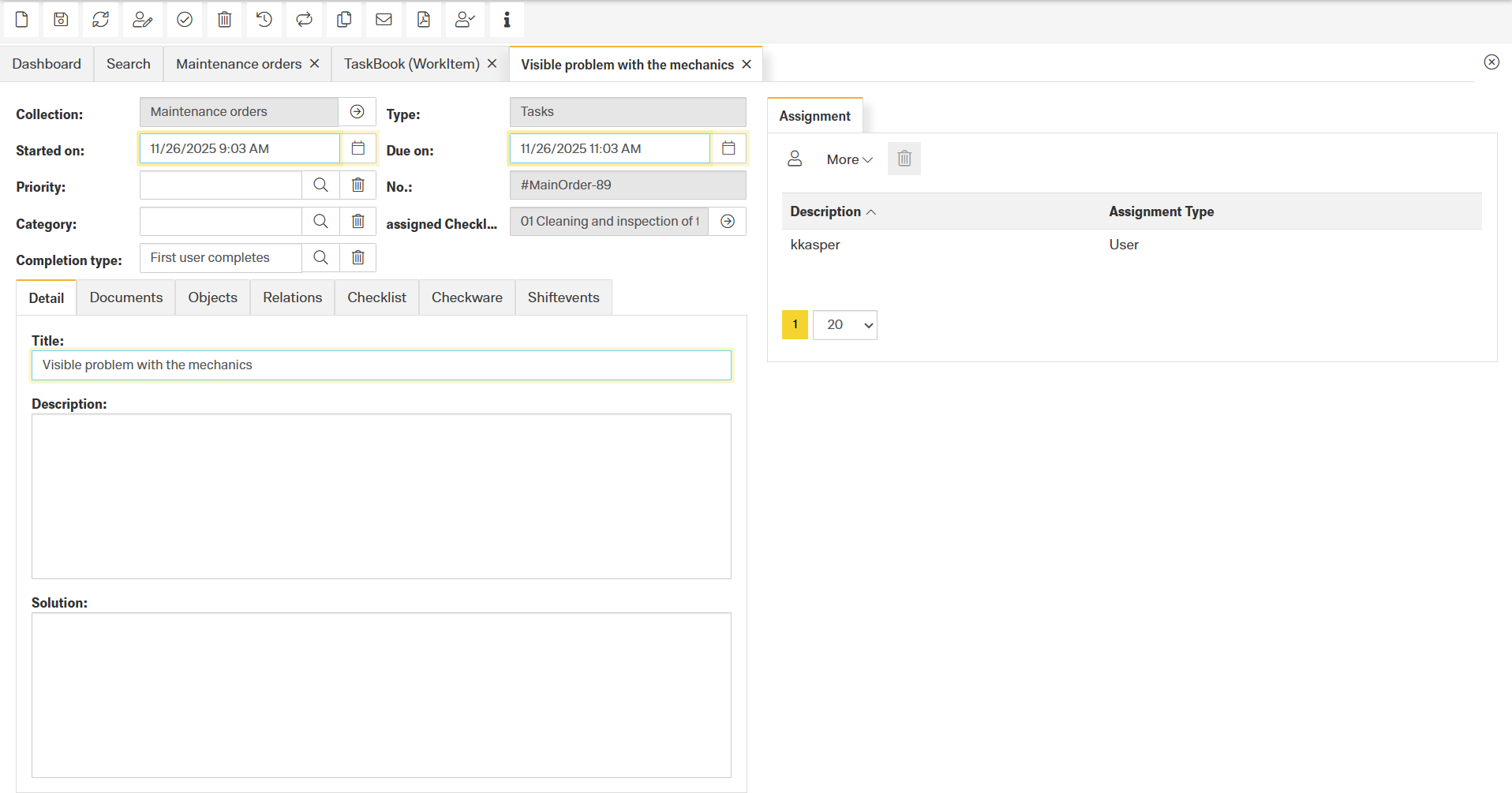
A Task (WorkItem) represents an actionable work unit inside a Work Item Collection. It is used to document, assign, track, and complete activities such as maintenance tasks, inspections, instructions, or audits.
The task form consists of several functional areas: task actions, details, linked objects, documents, checklists, assignments, and relations to other Finito modules.
The Work Item Collection the task belongs to.
Defines the work item type.
Examples:
Task
Instruction
Audit
Planned start and end times for the task.
Defines urgency or importance.
Classifies the task into an organizational or technical category.
Attach a specific checklist that must be completed for the task.
Defines how the task is considered “done”:
First user completes – any assignee can complete it
All assigned users must complete – all recipients must confirm completion
These actions allow users to manage the full lifecycle of a task:
New
Create a new task.
Save
Save all modifications.
Refresh
Reload the task with the latest data from the server.
Delete
Permanently remove the task.
Print
Export the task as a PDF.
Set task in progress
Sets the task to an in-progress state. (Currently not active, planned for a future release.)
Complete
Mark the task as completed.
Approve
Approve a task. (Currently not active, planned for a future release.)
Audit trail
Shows all changes (who, when, what).
Information
Displays simplified metadata such as creator and last modifier.
Recurring Work allows tasks to be created automatically in defined intervals. This is useful for routine activities such as inspections, maintenance cycles, compliance checks, or any other periodic work requirement.
The Series Definition dialog controls the recurrence pattern and determines how long the series should run.
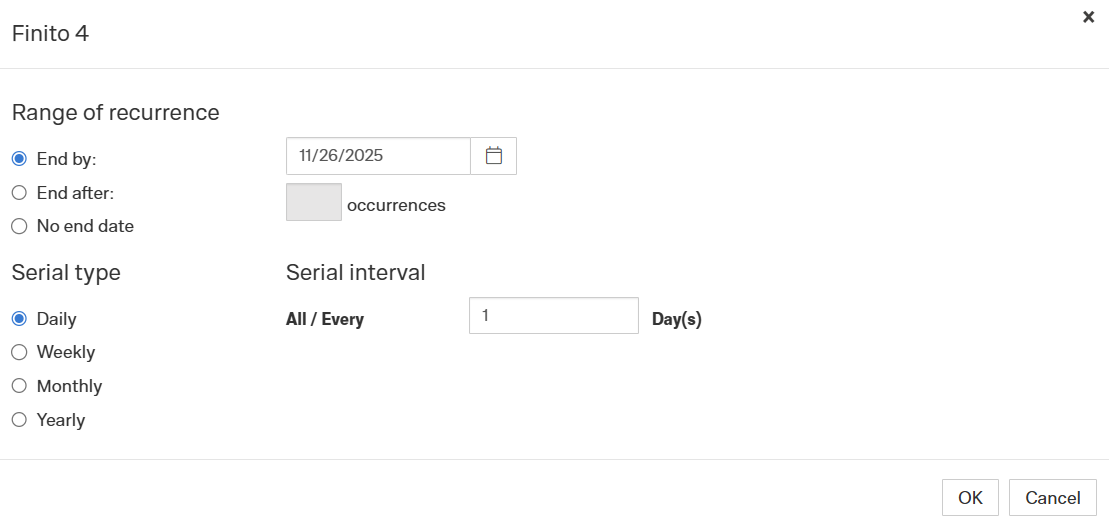
This section defines how long the recurrence pattern remains active.
A specific calendar date.
The recurrence stops after the selected date is reached.
The series ends after a defined number of occurrences.
Example: End after 10 occurrences → only 10 tasks will be created.
The recurrence runs indefinitely until manually stopped.
This determines how often the task repeats.
Creates a new task every X days.
Examples:
Every 1 day → daily
Every 7 days → weekly-equivalent but based on day count
Every 30 days → monthly-equivalent but fixed interval
Creates a new task every X weeks.
(Depending on Finito configuration, this may allow selecting specific weekdays.)
Creates a new task every X months.
This is typically used for monthly routines:
Monthly inspections
Monthly equipment cleaning tasks
Regular safety walkthroughs
Creates a new task in yearly cycles, often used for:
Annual audits
Yearly safety or compliance checks
Annual equipment certifications
Send via Email
Sends task information via email. (Currently not active, planned for a future release.)
The Detail tab contains all standard fields for documenting the task.
Title
Clear, short description of the issue or task.
Description
Detailed explanation, context, observations, or instructions.
Solution
Measures taken, corrective action, or final outcome.
Upload files or attach external links relevant to the task.
Define on which object the task must be performed
(e.g., equipment, device, asset, functional location).
Link to related tasks such as:
follow-up tasks
predecessor tasks
parallel activities
dependency relations
Attach or complete checklists directly within the task.
Mainly used for recurring compliance checks.
Example use case:
“Every 7 days, the checklist XYZ must be completed.”
Here you can link the appropriate checklist template.
(Only available when integrated with the digital shiftbook.)
Link shift events that are related to the task, e.g.:
malfunctions
shift notes
abnormalities
safety incidents
Optional tab that can be added to capture custom attributes when additional information must be maintained beyond the default fields.
A task can be assigned to various types of recipients:
User
Direct assignment to an individual user.
Role
Assign a role (dynamic — new users in the role automatically see the task).
Users by role
Snapshot of current role members (static — does not update if the role changes).
Service provider
Assign a task to an external contractor.
Users by service provider
Shiftbook
Users by shiftbook
Shift
Assign tasks to a specific shift (early, late, night shift, etc.)
| Option | Dynamic? | Explanation |
|---|---|---|
| Role | ✔ Yes | Always reflects current role members |
| Users by role | ✘ No | A snapshot of users at assignment time |