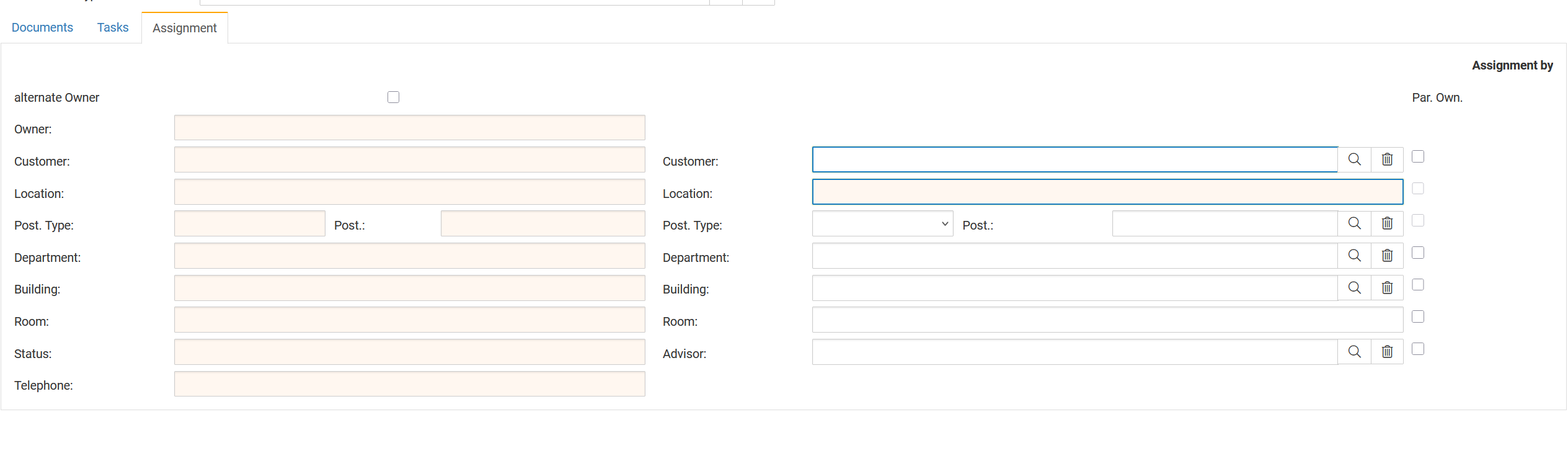
Additional fields allow users to enrich objects with organizational, location-based, or ownership-related metadata.
These fields do not influence Work Management itself but help structure assets more consistently across the platform.
They are primarily used for:
Asset organization
Location structuring
Ownership tracking
Facility and room assignments
Customer relationships (for service organizations)
To use additional fields inside an object, the Assignment tab must be enabled within the Object Type.
Steps:
Navigate to Search → Object Type
Open the desired Object Type
Activate the Assignment tab
Save the Object Type
Once enabled, every object of that type will display a new Assignment tab where the additional metadata fields can be filled.
The Assignment tab includes a series of optional fields:
Owner
Customer
Location
Post Type / Post
Department
Building
Room
Status
Telephone
Advisor (requires a person entry)
These fields appear in a structured two-column layout, allowing the user to enter or link reference values.
When the Assignment tab is enabled for an Object Type:
Certain fields automatically become mandatory, specifically:
Customer
Location
This means:
Objects of this type cannot be saved without filling these fields.
Customers should only activate this tab if they intend to use these metadata fields consistently.
Each field pulls its values from a separate master data list.
These can be maintained via the search function in Finito:
| Field | Master Data Search Term | Notes |
|---|---|---|
| Customer | Customer | Used for external clients or internal customers |
| Location | Location | Generally tied to geographic or facility locations |
| Department | Department | Internal company departments or divisions |
| Building | Building | Facility or building names |
| Room | Room | Specific rooms within buildings |
| Advisor | Person | Must be linked to a person entry |
For all fields except Advisor, users can manage and create new entries under their respective search categories.
These additional fields are not relevant for:
Task assignment
Work management
Checklists
Shift events
Their purpose is organizational structure, not operational workflow.
Typical use cases:
Mapping assets to customers in service organizations
Aligning tools and equipment with locations and departments
Structuring facilities (building → room → equipment)
Assigning responsibility (owner, advisor)
Preparing for richer reporting and filtering later on.