(this page was created automatically. In case of formatting issues, please visit the official Wiki Page)
Accordion
Overview
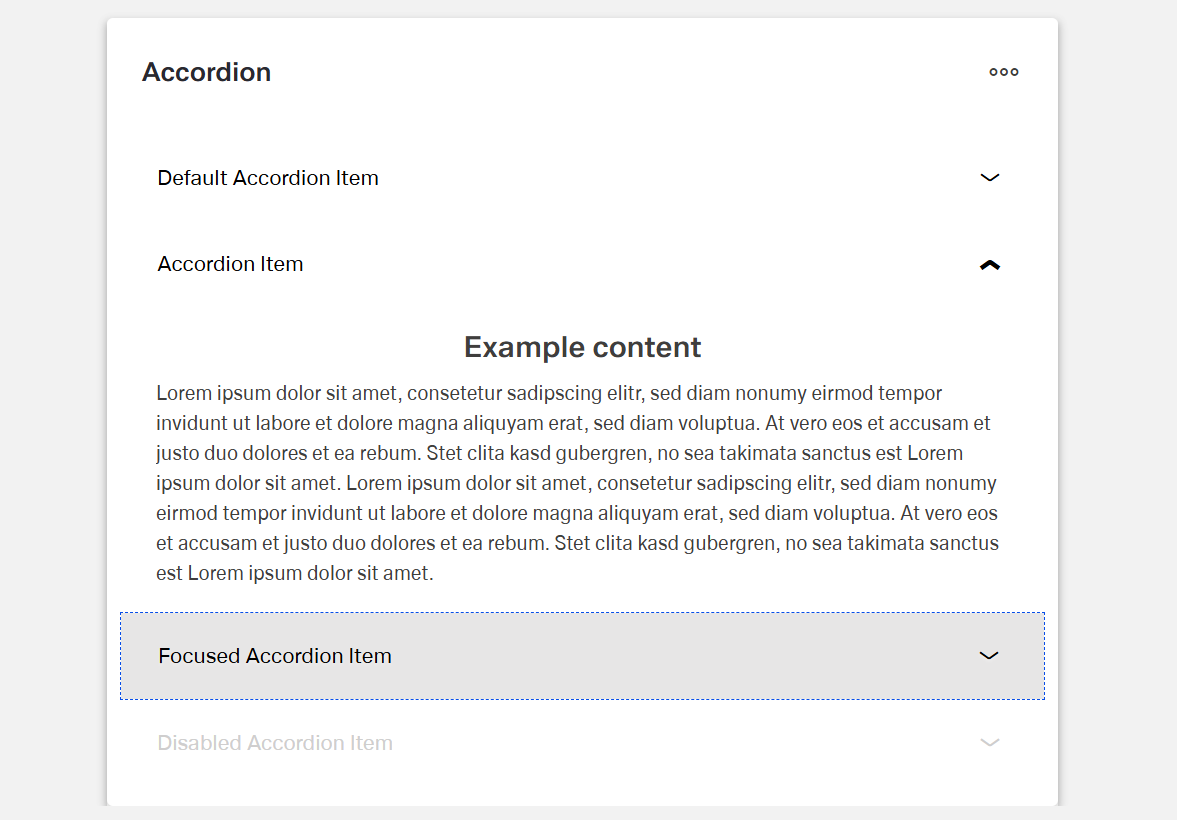
The Dynamic Accordion component is a collapsible content container.
It organizes information into expandable and collapsible sections.
Each accordion item (child component) has a title that remains visible.
The content of each section can be expanded or hidden.
Specs
Structure
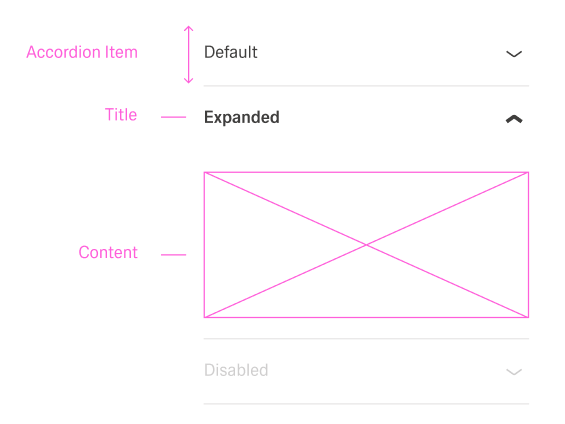
- The accordion is made up of an array of DynamicAccordionItemComponent objects.
- Each item contains a title that is always visible.
- Each item also contains content that can be expanded or collapsed.
General Properties
- displayName — Sets the display name of the component shown in the structure panel. For example, "Product FAQ" allows for easy identification of the accordion's purpose in the component structure.
Visual Properties
- Accordion Items can be added manual through "Add Accordion Item" or a data source through a template (useTemplate).
Accordion Template (Header/Content)
General Properties
- displayName — Sets the display name of the component shown in the structure panel. For example, "Product FAQ" allows for easy identification of the accordion's purpose in the component structure.
Visual Properties
- title – Sets the title text displayed in the accordion, with support for multiple languages. For example, {"en-US": "Contract Details", "de-DE": "Vertragsdetails"} ensures proper localization of the title based on the user's language settings. This title helps users understand what document they're viewing.
- disabled – Controls whether users can interact with the accordion. When set to true, the accordion appears grayed out and cannot be changed by users.
- layout - Determines how child elements are arranged within the accordion template. Options include "vertical" (stacked elements) or "horizontal" (side-by-side elements). For example, "horizontal" places items in a row rather than stacking them.
- alignItemsClass - Controls the vertical alignment of child elements within the accordion template. For example, "align-items-center" centers all child elements vertically within the section.
- gapClass - Configures the spacing between child elements within the accordion template. For example, {"row": "row-gap-4", "column": "column-gap-2"} creates consistent spacing between elements with more vertical than horizontal spacing.
Events
Configures the events that the component can trigger and respond to:
- ON_INIT — Triggered when the accordion component is initialized. Can be used to perform setup operations like loading default data or setting initial states.
- ON_DESTROY — Triggered when the accordion component is removed from the DOM. Useful for cleanup operations and releasing resources.
Testing Hooks
- dataTestId — Sets the testing hook ID for automated testing. For example, setting it to
"faq-accordion" allows test scripts to reliably locate this component.
- enableAsHotspot — Enables the component as a guided tour hotspot. When enabled, the accordion can be highlighted during guided tours of your application.
Datasource
- dataSourceId — Specifies the data source for retrieving accordion data. For example, api/featured-products connects the component to the products API endpoint.
- getEntityCollectionHttpRequestParametersMap — Configures HTTP parameters for data fetching, including query parameters, path parameters, and headers. This object maps additional parameters needed for the request.
Events
Configures the events that the component can trigger and respond to:
- ON_INIT — Triggered when the accordion component is initialized. Can be used to perform setup operations like loading default data or setting initial states.
- ON_DESTROY — Triggered when the accordion component is removed from the DOM. Useful for cleanup operations and releasing resources.
Authorization
- visibilityPolicySetId - Determines the visibility of the component based on specified policy sets. For example, setting to "adminOnlyPolicy" restricts the form to users with admin privileges, preventing unauthorized access to sensitive information.
Visibility
- displayConditions – Defines conditions for displaying the component based on context data or expressions. For example, configuring it to display only when "userType === 'advanced'" ensures the grid appears only for advanced users, providing a conditional layout experience.
Testing Hooks
- id - Specifies a unique identifier for the component used for programmatic access. For example, "fqa-accordion" enables targeted manipulation of this specific accordion.
- dataTestId — Sets the testing hook ID for automated testing. For example, setting it to
"faq-accordion" allows test scripts to reliably locate this component.
- enableAsHotspot — Enables the component as a guided tour hotspot. When enabled, the accordion can be highlighted during guided tours of your application.
Layout
- paddingClass — Configures spacing around the accordion content using CSS classes. For example,
"p-4" adds medium padding on all sides of the accordion for better visual separation from surrounding elements.
Links
- Figma: https://www.figma.com/design/yck1tcUXgdQ5aYX6iUAwrO/GE---Astronaut-Design-System?node-id=11521-150180&t=iosNC2AkSTGs5lMh-1
- Life style guide: https://e1-dev.k8s.myapp.de/live-style-guide/id5/1-accordion
Guidelines
Usage & Content
An accordion is used as a progressive disclosure pattern when content is related but not always needed on screen.
The items hold secondary content that supports, but does not replace, the main content.
Each item title describes one clear topic so the collapsed list is easy to scan.
A meaningful displayName is set so the accordion can be recognized quickly in the structure panel.
Layout & Spacing
The layout is chosen to match the content.
The layout property is set to "vertical" for stacked reading and forms, while the "horizontal" layout is reserved for short, side-by-side content. Gap classes are used to keep clear spacing between header parts and content.
Padding is applied with paddingClass so content does not touch the container edges and neighboring components still have enough breathing room.
Visibility & Authorization
Visibility rules ensure that the accordion appears only when it is relevant, and sections that do not apply to a user are not shown.
Sensitive accordions are fully hidden for users without permission.
Conditional visibility keeps the layout clean by hiding empty or irrelevant accordions.
Content Quality & Clarity
Short, descriptive titles in sentence case are written so the title field clearly states what is inside each item.
Internal displayName values are aligned with the visible titles, and the names in the structure panel roughly match what users see in the UI.
Dos and Don’ts
Usage & Content
Dos
- Use the accordion for related content that is not always needed on screen, and let the items hold this secondary information.
- Give each item a title that covers exactly one topic so the collapsed list stays easy to scan.
- Set a meaningful
displayName such as “Product FAQ” or “Billing sections” so the accordion can be recognized quickly in the structure panel.
Don’ts
- Do not use the accordion for content that must always be visible, and do not hide critical information behind expansion.
- Do not combine unrelated topics into a single item.
- Do not keep generic internal names such as “Accordion 1”, and do not show machine-like keys or placeholders to end users.
Layout & Spacing
Dos
- Choose a layout that matches the content.
- Set
layout to "vertical" for stacked reading and forms, and use "horizontal" only for short, side-by-side content.
- Apply gap classes and
paddingClass so items are well spaced and content does not touch the container edges.
Don’ts
- Do not force a horizontal layout for long labels or dense forms, to avoid awkward text wrapping.
- Do not leave icons and text misaligned, and do not let headers look uneven because
alignItemsClass is missing.
- Do not allow gaps to be too tight or missing, and do not let the accordion sit directly against neighboring components or look cramped due to missing padding.
Visibility & Authorization
Dos
- Use visibility rules so the accordion appears only when it is relevant, and hide sections that do not apply to a user.
- Fully hide sensitive accordions for users without permission.
- Use conditional visibility to keep the layout clean by hiding empty or irrelevant accordions.
Don’ts
- Do not leave irrelevant accordions visible just because they exist in the template.
- Do not show sensitive content and then block it only with text such as “no access.”
- Do not leave empty accordions on the page, and do not let unused shells clutter the layout when
displayConditions can hide them.
Content Quality & Clarity
Dos
- Write short, descriptive titles in sentence case so the
title field clearly states what is inside each item.
- Align internal
displayName values with visible titles, and ensure names in the structure panel roughly match what users see in the UI.
Don’ts
- Do not use long sentences, technical IDs, or slogans in headers that must be scanned quickly.
- Do not use completely different internal and external names without a strong reason, so
displayName and title do not create confusion for authors or testers.
Accessibility
- Provide meaningful, unique titles for each section so context is clear even when collapsed (
elements.title). Use plain-language; avoid icon-only labels (elements.title).
- Expose a stable handle for automated accessibility checks (
dataTestId).
- Avoid color-only meaning; place essential cues in text (
elements.title, elements.content).
- Keep expansion order predictable by establishing item order during initialization (
ON_INIT, elements).