
Checkboxes are used when there are multiple items to select in a list. Users can select zero, one, or any number of items.
Basic
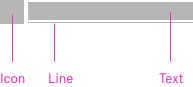
The checkbox molecule consists of 3 atoms
Icon - Text - Line
width: can vary, height: 24px
Icon size: 24x24
Icon color: Same as text color
Color
!!! define color here
pawel tomkowski makes it sense to put the style information from live style guide here?
| Class | Property | Color token |
|---|---|---|
.bx--link | color | $link-01 |
Interactive States
| Class | Property | Color token |
|---|---|---|
:hover | text color | $hover-primary-text |
:active | text color | $text-01 |
:focus | border | $focus |
:visited | text color | $visited-link |
:disabled | text color | $disabled-02 |
!!! add picture here
Typography
Links should not exceed three words.
| Property | Font-size (px/rem) | Font-weight | Text style |
|---|---|---|---|
.bx--link | 14 / 0.875 | Regular / 400 | $body-short-01 |
Structure
Recommended
Links can be grouped horizontally or vertically and must be underlined. The following specs are not built into the Link component but are recommended by design as the proper distance between grouped Links.
| Class | Property | px / rem | Spacing token |
|---|---|---|---|
.bx--link | padding-right | 16 / 1 | $spacing-05 |
Preview the link component with the React live demo. For detailed code usage documentation, see the Storybooks for each framework below.
!!! create live demo here.
pawel tomkowski makes it sense to put the code from live style guide here as an iframe?
Test
!!!this section needs to rework
How it works
The link Carbon component is primarily a native HTML hyperlink navigational element. The Enter key activates the link and causes the user agent to move focus to the link destination. When you use the disabled link component the ARIA state is set to aria-disabled="true", which changes the appearance and the tabindex="-1" which removes the link for the tab order. When the link becomes active the ARIA state changes to aria-disabled="false" and the link is present in the tab order.
Accessibility considerations
This component has been validated to meet the WCAG 2.0 AA and Section 508 accessibility guidelines, however changes made by the content owner can affect accessibility compliance. Be sure to review and follow the guidance in this section when updating or adding new content to this component.
- Link text is the visible label for the native HTML link and is used to provide the purpose of the link which is clear and easy to understand for all users.
- The alt attribute for the img element is used to describe the purpose of a graphical link with an image inside the link.
- The title attribute can be used to supplement the link text with any additional useful description.
