
Zeplin Styleguide
| Inline Notification | Zeplin Documentation | Layout example | |
|---|---|---|---|
| 1 | ID2 Inline Notification | https://zpl.io/aglyzgZ | coming soon |
Live Style Guide
Extra UX information:
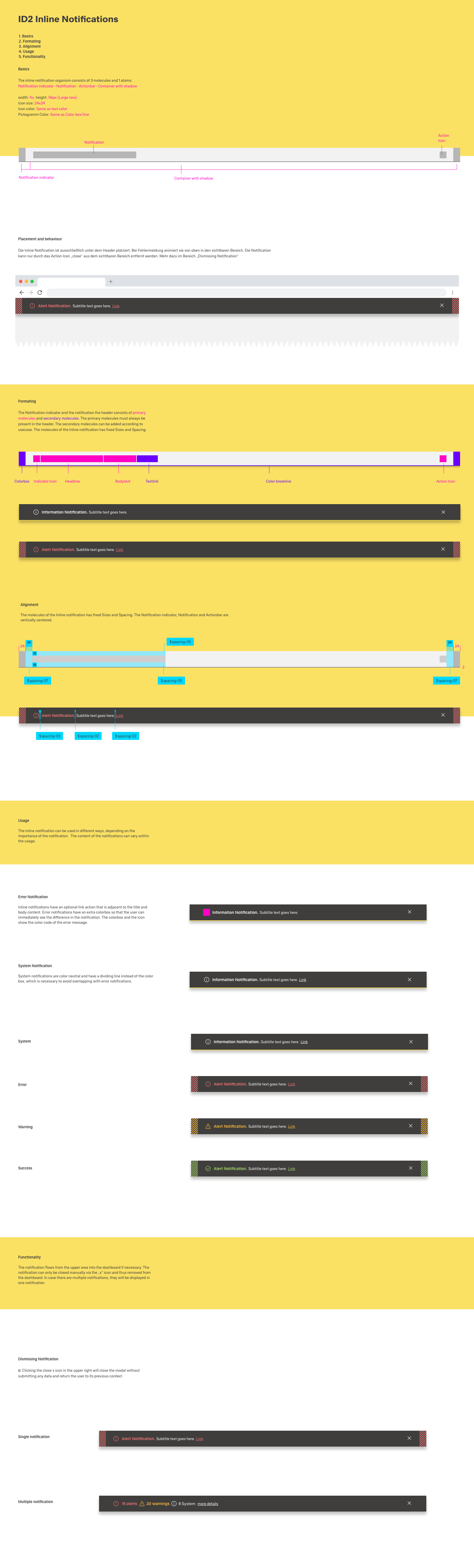
Those Inline notifications will only be used to show system information, not to guide the user to specific user notifications. These user notifications will be handled within the Toast Notifications.
The Inline notification will slide in from the top and can be closed via a 'X' or will auto dissapear after a few seconds.
It could also contain a link which could navigate to another page, show details or invoke an action.
It is possible to have multiple notifications at the same time, in thise case only 2 will be shown as a maximum. More then 2 will lead to a 'Multiple notification'. When you click on more details the will all be shown.
Good examples per instance:
- System: "There is a new version of the application. Please reload your page."
- Error:
- email or password is incorrect : "This E-mail address or Password does not exist. Please enter a different one."
- sytem is down: message to be specified.
- Warning: used for validation messages:
- when trying to delete the last role on a menu: "Not possible to delete the last role on a Menu. Please retain at least one role."
- when trying to change the settings from a dashboard to non scrollable if not possible: "Not possible to save dashboard size changes. Please change dashboard or boardlet size and try again."
- Success: showing succesfull transaction:
- when saving a boardlet or dashboard: "Boardlet Saved. Microfront End | Car Industry |Image displayer"
- success doesn't need a close X and will auto disappear after a few seconds.
