
Checkware Event Engine
Today it is possible to assign a C# .NET dll to every checklist in Checkware and react on specific Checklist events (e.g. Init of Checklist, Complete etc...) with custom logic. With this functionality it is possible for example to send an email when a checklist is completed by someone.
We are now planning a new "Checkware event engine" based on JavaScript, so that checklist creators can build checklist and associated actions / events with the same programming language.
Event Engine Runtime
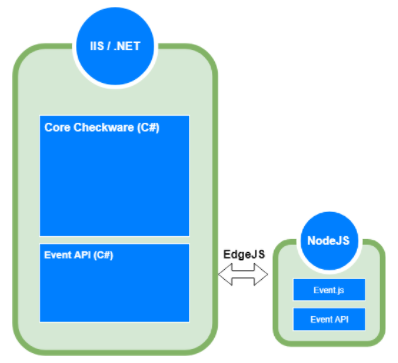
The event engine should run on top of NodeJs and the specific checklist event code should be triggered on server side from the core Checkware .NET process. To achieve this we will use EdgeJs which brings both worlds (.NET CLR & NodeJS) together. For some specific actions (see below) it will also be necessary, that the JavaScript Event API will also "call" back to
Here are some requirements for the event engine Runtime:
- handle timeouts (e.g. if an event takes too long, cancel it and notify the user)
- ....
JavaScript Event API
API object
API object is a core of JavaScript Event API and can be accessed via checkware variable. This object is used to invoke functions and it also contains an additional properties, like type of event that called a current script.
TODO: document
checkware.userId
checkware.roleId
checkware.username
checkware.languageSymbol
checkware.mandatorId
checkware.eventScriptId
checkware.evaluationId
checkware.checklistId
checkware.eventType
checkware.sendMail
checkware.debug
checkware.getValue
checkware.setValue
checkware.createEvaluation
checkware.deleteEvaluation
checkware.completeEvaluation
checkware.getEvaluations
checkware.assignTo
checkware.createTask
checkware.deleteTask
checkware.callConnector
checkware.setSetting
checkware.setSetting
Events
Events can be used to trigger some specific functionality (e.g. send mail) when something specific happens (e.g. when the checklist has been saved). Event type is specified in checkware.event property as string.
Possible types of event:
- init
- save
- complete
- delete
Switch statement is a recommended approach to check the type of event. For example:
switch (checkware.event) {
    case 'init':
        // ...
        break;
    case 'save':
        // ...
        break;
    case 'complete':
        // ...
        break;
    case 'delete':
        // ...
        break;
    default:
        // ...
}
Functions
As mentioned before, API functions can be invoked using a checkware variable. Functions take JSON object or simple primitive value as the only one parameter. Properties in JSON object parameter can be placed in no specific order. Here is an example function call:
var setting = checkware.getSetting('Foo');All available functions are described below.
Main functions
sendMail()
Can be used to send an email to someone.
- Parameter
{
    recipients: string, // recipients seperated with ';'
    subject: string,
    message: string,
    attachPdf: boolean // optional
}- Return void
- Example
checkware.sendMail({ recipients: 'JohnDoe@example.com;JaneDoane@example.com', subject: 'ExampleSubject', message: 'ExampleMessage', attachPdf: true });getValue()
Can be used to get an EvaluationValue. If evaluationId is not specified, the EvaluationValue is retrieved from current Evaluation.
- Parameter
{
    evaluationId: string // optional
    matchcode: string,
}
- Return string || number || boolean
- Examples
var evaluationValue = checkware.getValue('ExampleMatchcode');
var evaluationValue = checkware.getValue({ evaluationId: '11111111-2222-3333-4444-555555555555', matchcode: 'ExampleMatchcode' });
setValue()
Can be used to set an EvaluationValue. If evaluationId is not specified, the EvaluationValue is set to current Evaluation.
- Parameter
{
    evaluationId: string // optional
    matchcode: string,
    value: string || number || boolean
}
- Return void
- Example
checkware.setValue({ matchcode: 'ExampleMatchcode', value: 'ExampleValue' });
checkware.setValue({ evaluationId: '11111111-2222-3333-4444-555555555555', matchcode: 'ExampleMatchcode', value: 'ExampleValue' });
createEvaluation()
Can be used to create a new Evaluation.
- Parameter
{
    folderStructureChecklistId: string,
    parameters: { key: string, value: string }[] // Matchcode-Value
}
- Return void
- Example
checkware.createEvaluation({ folderStructureChecklistId: '11111111-2222-3333-4444-555555555555', parameters: [{ key: 'ExampleMatchcode', value: 'ExampleValue' }] });
deleteEvaluation()
Can be used to delete an Evaluation. If evaluationId is not specified, the current Evaluation is deleted.
- Parameter evalautionId: string (optional)
- Return void
- Example
checkware.deleteEvaluation();
checkware.deleteEvaluation('11111111-2222-3333-4444-555555555555');
completeEvaluation()
Can be used to complete a current Evaluation. If evaluationId is not specified, the current Evaluation is completed.
- Parameter evalautionId: string (optional)
- Return void
- Example
checkware.completeEvaluation();
checkware.completeEvaluation('11111111-2222-3333-4444-555555555555');
getEvaluations()
Can be used to get an Evaluation list. Comparison operator can be set in filter object through operator property. If operator is not specified for filter object, operator from comparisonOperator parameter is used. If comparisonOperator parameter is not specified, the AND operator is used.
- Parameter
{
    filter: { matchcode: string, value: string, operator: string /* 'or' || 'and', optional */ }[],
    checklistIds: string[], // optional
    comparisonOperator: string // 'or' || 'and', optional
}
- Return
Array<{
    EvaluationId: string,
    ChecklistId: string,
    ComplateDate: Date,
    InsertDate: Date,
    InsertBy: string,
    ClosedByUserId: string,
    UpdateDate: Date,
    UpdateBy: string,
    EvaluationValues: { Matchcode: string, Value: string || number || boolean }[]
}>
- Examples
var evaluations = checkware.getEvaluations([{ matchcode: 'ExampleMatchcode', value: 'ExampleValue' }]);
var evaluations = checkware.getEvaluations([{ matchcode: 'ExampleMatchcode1', value: 'ExampleValue1' }, {matchcode: 'ExampleMatchcode2', value: 'ExampleValue2', operator: 'or' }]);
var evaluations = checkware.getEvaluations({ filter: [{ matchcode: 'ExampleMatchcode', value: 'ExampleValue' }], checklistIds: ['11111111-2222-3333-4444-555555555555'] });
var evaluations = checkware.getEvaluations({ filter: [{ matchcode: 'ExampleMatchcode', value: 'ExampleValue' }], checklistIds: ['11111111-2222-3333-4444-555555555555'], comparisonOperator: 'or' });
assignTo()Can be used to assign a Evaluation to another User. If evaluationId is not specified, the User is assigned to current Evaluation.
- Parameter
{
    evaluationId: string // optional
    roleId: string // optional
    username: string,
}
- Return void
- Examples
checkware.assignTo('ExampleUser');
checkware.assignTo({ evaluationId: '11111111-2222-3333-4444-555555555555', username: 'ExampleUser' });
checkware.assignTo({ roleId: '11111111-2222-3333-4444-555555555555' });
   ==> If a Role is alrady assigned to a avaluation, then they will no longer overwritten.
createTask()Creates a new Task.
- Parameter
{
    folderStructureChecklistId: string, // optional
    taskType: number, // 0: all users must return; 1: one user must return
    startDate: string, // 20101220101233   yyyyMMddHHmmss
    endDate: string, // 20101220101233   yyyyMMddHHmmss
    description: string
    recipients: string[] // array of usernames
}
- Return void
- Example
checkware.createTask({
    folderStructureChecklistId: '11111111-2222-3333-4444-555555555555',
    taskType: 1,
    startDate: '20180601120000',
    endDate: '20180610120000',
    description: 'Example description',
    recipients: ['ExampleUser1',  'ExampleUser2']
});
deleteTask()Deletes a Task which is assigned to a Evaluation. If evaluationId is not specified, Task from current Evaluation is deleted.
- Parameter evalautionId: string (optional)
- Return void
- Examples
checkware.deleteTask();
checkware.deleteTask('11111111-2222-3333-4444-555555555555');
callConnector()
Calls connector method.
- Parameter
{
    connectorKey: string,
    method: string,
    parameter: string // JSON object
}
- Return ConnectorResult
{
    Success: boolean,
    Message: string,
    Result: object
}
- Example (for C# Connector Call)
var result = checkware.callConnector({ connectorKey: 'Demo1', method: 'Add', parameter: '{ Number1: 10, Number2: 5 }' });
- Example (for Sql Connector Call)
checkware.callConnector({connectorKey: 'Sql', method: 'action', parameter: JSON.stringify({
                                    ProcedureName: "ChangeZWertOnConfigurationItem",
                                    Parameters: [{Name: "@zWert", DataType: "string", Value: zWert},
                                                 {Name: "@configurationItemId", DataType: "guid", Value: configurationItemId}]
                                })});
Utility functions
debug()
Creates a log entry for the event execution. This is useful for debugging purposes, e.g. when user wants to know, if a specific line of code was executed.
- Parameter
{
    message: string,
    level: string
}
- Return void
- Example
checkware.debug({ message: 'ExampleMessage', level: 'warning' });
-> URL: #checkware/eventscriptlog
getSetting()
Gets a system setting from the database.
- Parameter setting: string
- Return string
- Example
var setting = checkware.getSetting('Foo');
setSetting()Sets a system setting in the database.
- Parameter
{
    setting: string,
    value: string
}
- Return void
- Example
checkware.setSetting({ setting: 'Foo', value: 'ExampleValue' });