
Basics
The basic framework of the dashboard consists of a header and the content area. Within the content area are the boardlets. All content is based on the 24 Colum-Grid.
The 24 Colum-Grid
The foundation of the design system is the modified bootstrap frontend grid. this grid has 24 columns within the dashboard and 12 columns within the boardlets. The dashboard is divided into two parts, header and content area. The 24 Columns Grid only applies within the content area. The grid has no column space, all distances are solved via the margin.
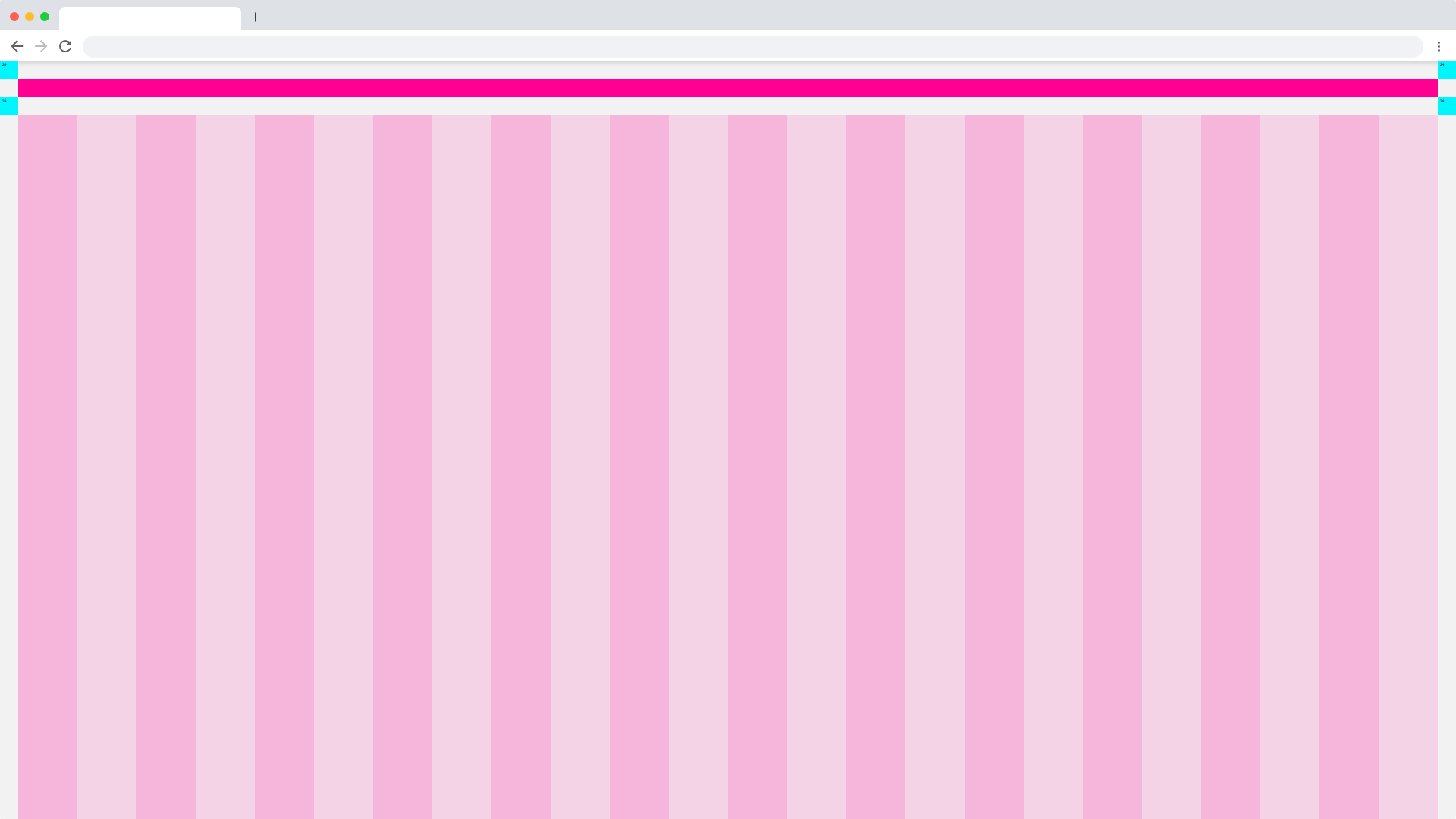
Basic Components of the Dashboard
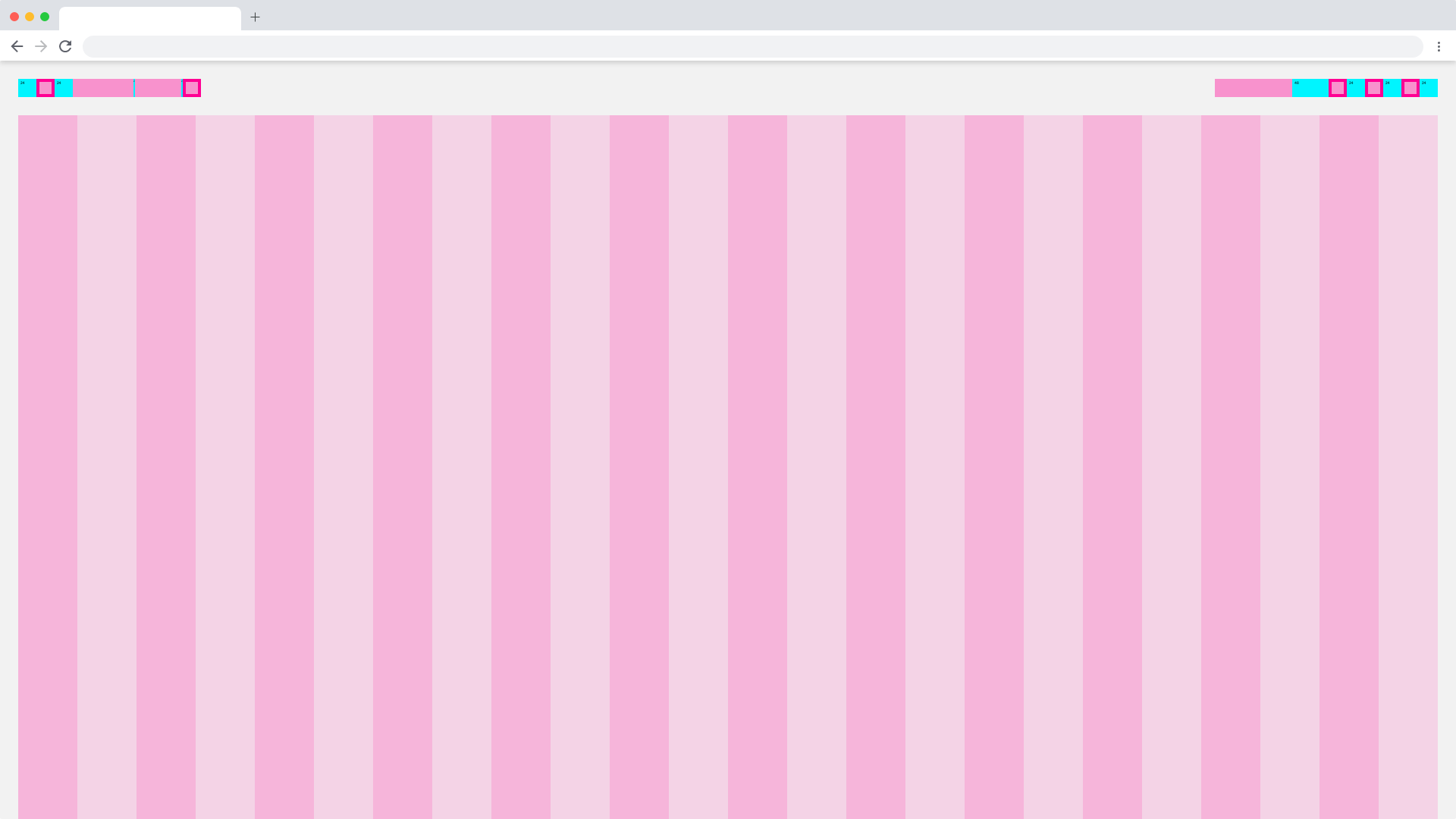
Web_Max/Dashboard_Spacing
Dashboard Spacing
| Base | web_max | web_max (rem) | web_min | web_min (rem) | tablet_landscape | tablet_landscape | tablet_portrait | tablet_portrait | mobile_portrait (px) | mobile_portrait | kiosk (px) | kiosk (rem) |
|---|---|---|---|---|---|---|---|---|---|---|---|---|
| Breakpoint | ≥1800px | - | ≥1200px | - | ≥960px | - | ≥576px | - | <576px | - | WiP | WiP |
| Width | 1920 | 120 | 1280 | 80 | 1024 | 64 | 768 | 48 | 375* | 23,438* | WiP | WiP |
| Height | - | - | - | - | - | - | 1024 | 64 | - | - | WiP | WiP |
| Content Area | ||||||||||||
| Column Width | 78 | 4.875 | 52 | 3.25 | 42 | 2.625 | 31 | 1.938 | 15* | 0,938* | WiP | WiP |
| Gutter | 26 | 1.625 | 16 | 1 | 8 | 0,5 | 8 | 0.5 | - | - | WiP | WiP |
| Content-Area Margin | 24 | 1,5 | 16 | 1 | 8 | 0,5 | 8 | 0.5 | 6 | 0,375 | WiP | WiP |
| Header Area | ||||||||||||
| Header-Area | 24 | 1,5 | 24 | 1,500 | 48 | 3 | 48 | 3 | 48 | 3 | WiP | WiP |
| Icon max | 24 | 1,5 | 24 | 1,500 | 48 | 3 | 48 | 3 | 48 | 3 | WiP | WiP |
| Icon min | 18 | 1,125 | 18 | 1,125 | 48 | 3 | 48 | 3 | 48 | 3 | WiP | WiP |
| Scrollable | yes | yes | yes | yes | yes | WiP | WiP | |||||
| Navi and Toolbar | ||||||||||||
| Height | - | - | - | - | 64 | 4 | 64 | 4 | 64 | 4 | WiP | WiP |
*Iphone 6 / WiP = Work in Progress
Dashboard Breakpoints
All dashboards are divided into different breakpoints. The breakpoints define the visual division and spacing of dashboards and boardlets in all possible digital formats. This UI design kit considers the Web_Max breakpoint as the default, all other breakpoints are located in the category subcategories.
Web_Min

Web_Min/Dashboard_Spacing
Tablet
Tablet_Landscape/Dashboard_Spacing
Tablet_Portrait/Dashboard_Spacing
Mobile
Mobile_Portrait/Dashboard_Spacing
Kiosk
Kiosk/Dashboard_Spacing
EdgeOne Dashboard Example
The EdgeOne Dashboard always consists of a header and the content area. The content area can be freely designed, all content must adhere to the 24 grid column. In the header, burgers, datepicker, logo and setting are obligatory. More information about the header can be found here: ID2 - Header
 1920/Dashboard_EdgeOne_Astronaut
1920/Dashboard_EdgeOne_Tokyo-at-Night
X-Series Dashboard Example
The X-Series dashboard always consists of a header and the content area. The content area can be designed freely, all content must adhere to the 24 grid column. In the header are burger, datepicker, logo and setting obligatory. More information about the header can be found here: ID2 - Header
1920/Dashboard_X-Series_Astronaut
1920/Dashboard_X-Series_Tokyo-at-Night
