
Page History
(this page was created automatically. In case of formatting issues, please visit the official Wiki Page)
Notifications
Overview
Notifications in Inspire Design give users clear, visual feedback about their actions and the state of the system. They show whether a process has been completed successfully, whether a problem has occurred, or how an ongoing process is progressing.
Notifications appear as Local, Global, and Toast Notifications. Together with the Notification Icon in the header and the Notification Panel on the right side of the dashboard, they form a connected notification experience across the application.
Anatomy
Notifications within Inspire Design have five major elements:
...
- Local Notifications in the form of Inline Notifications that are part of boardlets.
- Global Notifications as a pop-up at the top of the dashboard.
- Toast Notifications as a pop-up at the to-right of the dashboard.
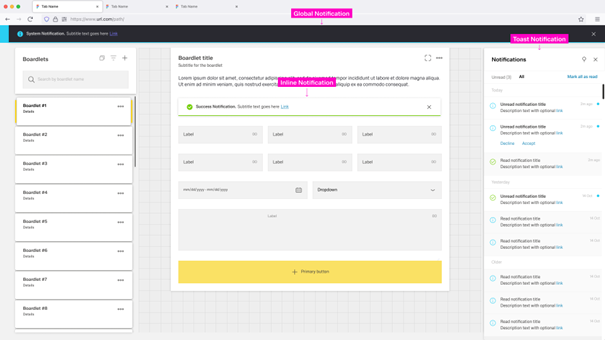 Global Notifications and Toast Notifications are independent of any dashboard and appear across the entire application.
The Notification Icon, Notification Panel, Toast Notification and Global Notifications build a global notification flow that activates when a user receives a Global or Toast Notification.
Local Notifications are tied to the dashboard and, in some cases, to the boardlet where they appear.
They are not connected to the Global Notification flow and vanish when the user leaves the dashboard.
The appearance of notification elements may vary between different types of notifications.
...
Users can open the Notification Panel by clicking the Notification Icon in the header , on a Global Notification, or on a Toast NotifiactionNotification.
It opens on the right side of the dashboard and has a fixed width.
...
The Toast Notification appears in the top-right corner and visually floats above the dashboard.
Only one Toast Notification can be visible at a time. They do not diappear automitcallydisappear automatically.
The color of the Toast Notification depends on the type of notification it contains.
The general layout stays the same between notifications, with the Progress Noti
...
Global Notifications appear as a bar at the top of the dashboard as a pop-up. Up to two Global Notifiactions Notifications can be visible at any time. They disappear after a set amount of time or if the user clicks the "close" button, if one is present.
Global notifications do not support the progress variant.
[TODO: Image]
- 01 Notification Icon - Signals the type of notification and matches the icon in the header.
- 02 Title - Few words describing the notification message.
- 03 Subtitle - Additional information clarifying the intend of the message.
- 04 Close Action - Optional close button for the notification
...
For more information on the component of the same name: Inline Notification
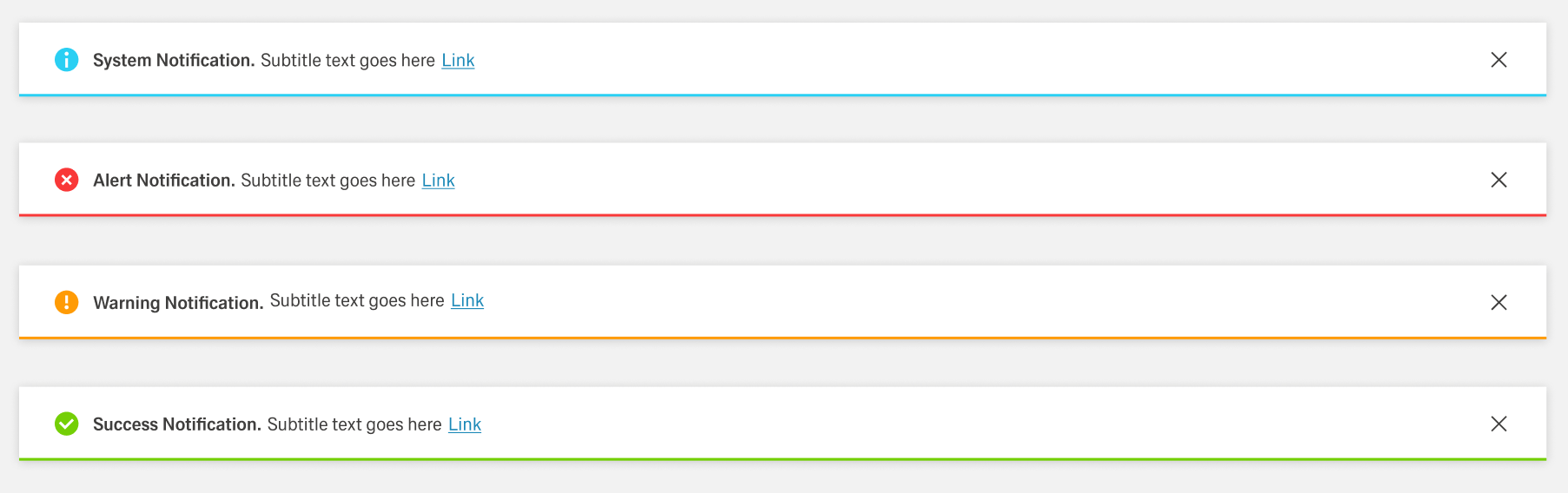
Inline Notifications are part of Local Notifications and appear inside components or boardlets in general. Their realm of influence is limited to the space they appear in and they are not listed in the Notification Panel. Inline Notifications have four states, determined by the type of notification. The content can vary by use case.
- Error Notification — Colored red; signals critical errors.
- Warning Notification — Colored orange; announces problems that may result in errors.
- Success Notification — Colored green; signals a successful process.
- System Notification — Colored blue; reports system information.
Modal Notification
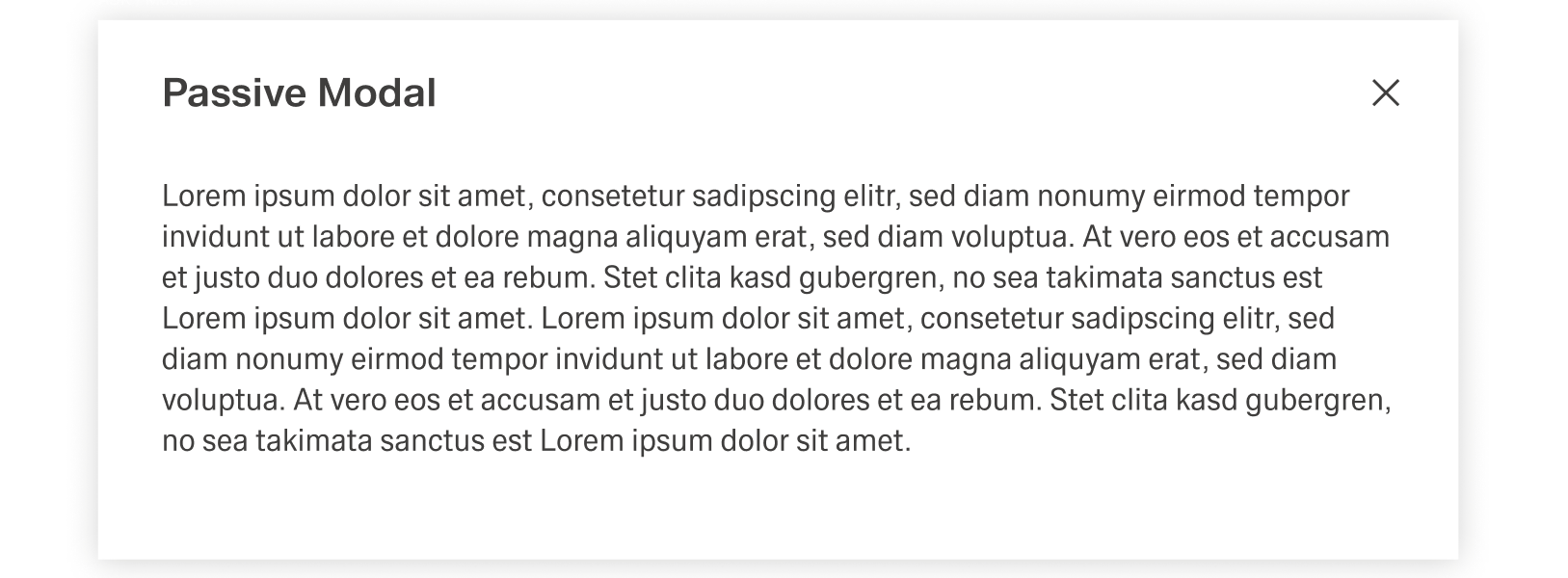
The Modal Notification is a varriation of the Dialog and appears as a centered passive modal above a dimmed background. It contains a critical message and can only be closed with the close action in the header toolba. It blocks interaction with the dashboard until it is closed.
Best Practices
Usage
...
Global Notification
Local Notifications are used for direct Global Notifications give feedback on an user action inside a dashboard. They are none permanent, disappearing when the user leaves the dashboard. Compared to Global and Toast Notifications, they are comparably non intrisive.
Local Notifications should be used, if
- The Notification is repetitive and would clutter the Notification Panel.
- The Notification is tied to a specific element inside a dashboard.
- The message is irrelevant on any other dashboard.
Local Notifications should not be used, if
- The message of the notification is relevant at a later point in time.
- The Notification is not tied to to any specific part of a dashboard.
- The notification is part of an ongoing background process.
- They are not directly activated by a user action.
Toast Notifications
Toast Notifications give global and onging feedback on background processes not related to a specific user action. They are intrusive, only disapprearing if the user interacts with them or changes dashboard. Can include interactions beyond closing, enforcing their focus on manageing background or ongoing processes.
They should not be used for static feedback or information directly related to user actions inside a boardlet.
Global Notifications
Global Notifications pertain information not directly related to user actions, but the system itself. They are intrusive and should thereby be resereved for crutial information.
Gobal Notifications should be used, if
- The message is of high importance, even outside the current dashboard.
- The notification is not directly triggered by a user interaction.
- Placing the notification inside the dashboard is not possible or would disrupt the content greatly.
Gobal Notifications should not be used, if
- The content is related to an ongoing background process.
- The notification is repetitive.
major user actions, for example saving a change inside a table. They appear at the end of a process and usually have an impact on the system, like changing data. They are always tied to user interaction or the inability for a user to perform an action.
Global Notification disappear after a set amount of time. This time should tailor to the notification length, so that users of all reading speeds can comprehend the message.
At the same time, it should only be if absolutely required, since the Global Notification is intrusive, blocking the header bar. In addition, the user should be able to close the Global Notification unless its presence is absolutely required.
Inline Notification
Inline Notifications deliver a direct response to a user action inside a larger process. One example for an Inline Action would be filling out a text field inside a form. The feedback, i.e. the notification, would be that the input is valid or invalid.
As shown in the example, Inline Notifications are used for immediate feedback on small scale user actions. They usually focus on sub-steps in a series and are tied to actions that on their own do not have a large impact.
Inline Notifications are not permanent, being deleted when the user abandons the process by for example switching dashboard. In addition, they are not displayed inside the notification panel.
These notifications usually change the layout of the boardlet they appear in, making them quite disruptive. Thereby they should only be used sparingly. For example, if a form has multiple text fields with specific requirements, they might only need one Inline Notification. This notification could then cover the message for all text fields, instead of every text field having their own notification.
It is also recommended to include the close button unless the presence of the notification is absolutely required.
Toast Notification
In contrast to Global and Inline Notifications, Toast Notifications are not focus of feedback of user actions. They inform the user about the system and background processes, for example downloading a file and the completion message afterwards. They can also include action beyond "closing" to influence the topic of the notification.
In contrast to Inline and Global Notifications, these Notifications are dynamic and live. They can replace each other, for example a success notification replacing a progress notification.
Toast Notifications are the only permanent form of notifications, being stored inside the Notification Panel. To not clutter the Notification Panel, the number of Toast Notifications sent should be no more than necessary.
Modal Notification
Modal notification is a consequence of direct user action. The trigger for the Modal Notification should be communicated clearly to the user with the use of the title or text. It is highly disruptive and therefore should only be used for critical information.
The text inside the modal notification can be longer than in other forms of notification. Despite this, it should be concise and to the point, since any type of user interaction is blocked by the overlay.
Text
Texts inside should be concise concrete, using active verbs and simple language whenever possible. They should avoid complicated or foreign words and abbreviation. Inline and Global Notifications should never have a message with multiple rows and Toast Notifications should avoid messages longer than three rows.
...
