User fields configuration
User fields are connected to the document and displayed in the general information of this document. The displayed user fields are a snapshot of the user field schema at the moment of the document upload. When uploading a document to the DMS, the user fields displayed in the general information are defined by the assigned user field schema of the folder.
The user fields can be changed by editing their configuration and by editing their content in general information. If the document is included in several folders, the updated user field contents are displayed whenever the general information of the document is opened, no matter the selected folder.
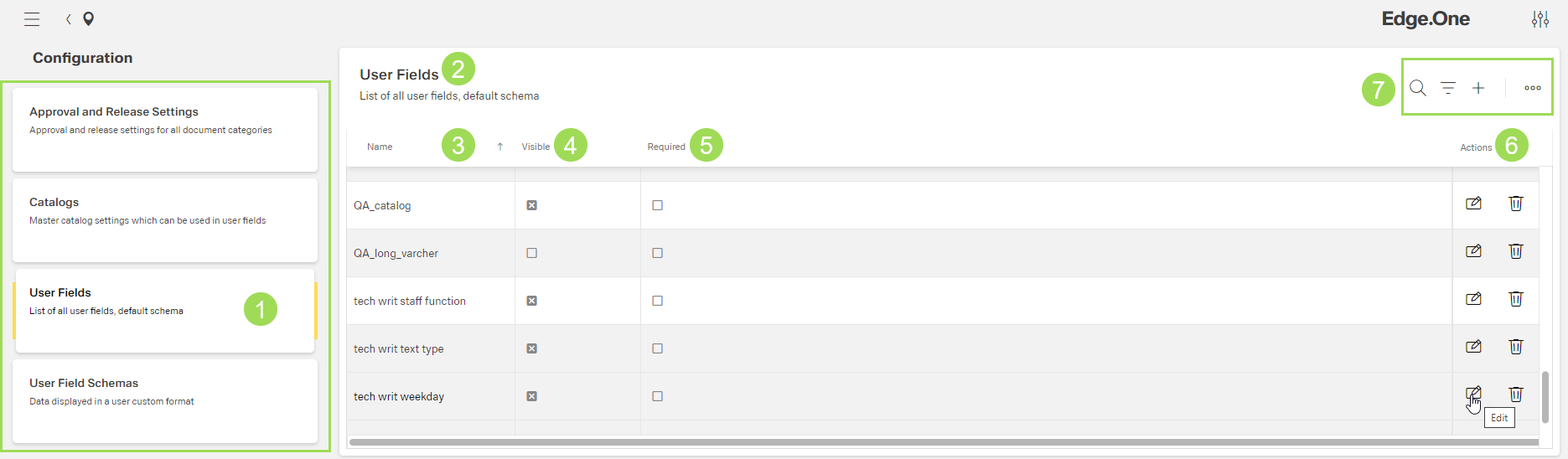
The illustration shows the submenu "User Fields": (1) main submenu bar, (2) header of the table with information about user fields, (3) column "Name", (4) column "Visible", (5) column "Required", (6) standard action buttons for a selected row/element, (7) standard action buttons to sort and group the table
| Element | Meaning / use | |
|---|---|---|
| 3 | name | used in user field schema table to select fields for this schema |
| 4 | visible | general state if this user field is displayed in general information |
| 5 | required | general state if this user field is set as mandatory |
Concerning their configuration, user fields can be
The content of a user field is defined by the catalog assigned to this user field. The default value of a user field to be shown in the general information of a document is also set in this configuration.